
How Gate Access Control Works: Keypads, Intercoms, Apps
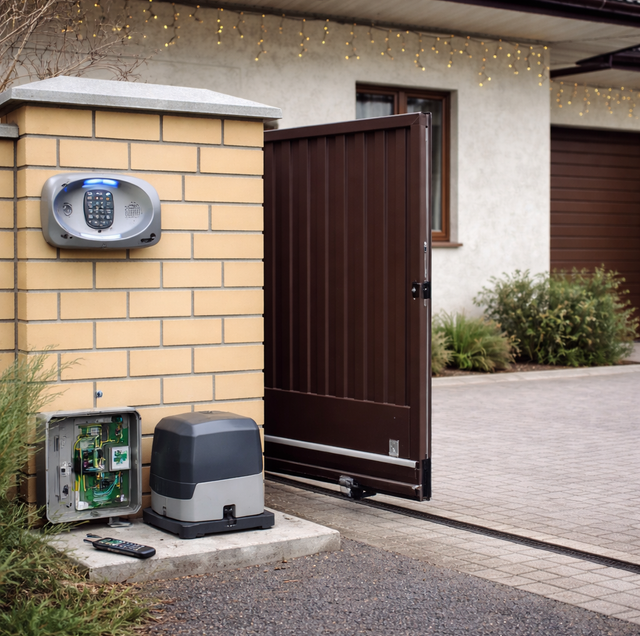
Quick Answer: Gate access control is how people and vehicles are granted entry through an automatic gate. A device (a keypad, remote, intercom, app, or card reader) sends an open command to the gate's operator through its control board, and the operator drives the gate open. The best method depends on how many users you have, whether you want entry logs and remote access, and how visitors will reach you.
Every automatic gate faces the same daily question: who gets to come in, and how do they tell the gate to open? Access control is the answer to both. It is the set of devices and methods that let a person or vehicle send an "open" signal to the gate, and it is the difference between a gate that everyone has to get out and hand-crank and one that recognizes the right people and swings aside on its own.
How The Signal Actually Reaches The Gate
Before comparing keypads and apps, it helps to see the chain every access method plugs into. Three parts do the work.
The operator (also called the gate motor or actuator) is the machine that physically moves the gate. On a swing gate, it is usually an arm or ram at the hinge; on a slide gate, it is a motor driving a gear rack along the bottom rail.
The control board is the small circuit board inside the operator's housing. It is the brain. Every access device you add wires or pairs to this board, and the board decides what to do when a valid signal arrives. It also manages the safety devices and the gate's open/close timing.
The access device is whatever the user interacts with: the keypad they type into, the remote they click, the phone that rings when a visitor calls. Its only job is to tell the board, "this entry is authorized, open the gate."
An access device is like the key to a car, not the engine. The key proves you are allowed to start the car, but the engine and drivetrain do the moving. Swap the key for a keypad code or a phone app, and the operator behind it is still what actually opens the gate. That separation matters when you choose a method, because you can change or add access devices later without replacing the operator.
The Common Ways To Open A Gate
Most homes end up with one or two of these, sometimes more as the household grows.
Remote or clicker: The simplest method. A handheld transmitter, the same idea as a garage remote, sends a radio signal to a receiver wired to the control board. Press the button, and the gate opens. Remotes are cheap to add and work well for the household's own vehicles, but they offer no record of who came in and are easy to lose or leave in a car that gets loaned out.
Keypad: A keypad mounts on a post or pedestal at the entrance. A driver or guest types a PIN, and a valid code triggers the open. Keypads can be wired to the operator or wireless (battery-powered, sending the code by radio). The real advantage is multiple codes: many keypads let you assign a unique PIN to each family member, the housekeeper, the pool service, or a specific contractor, so you can change or delete one code without disrupting everyone else.
Telephone or video intercom (callbox): An intercom, sometimes called a callbox, lets a visitor at the gate reach you before entry. A cellular or telephone-based unit dials your phone; you answer, talk to the visitor, and press a digit to open the gate from wherever you are. A video intercom adds a camera so you see who is there. Because many modern callboxes run on a cellular connection, the visitor can reach you even if you are away from the property.
Smartphone app and cloud system: A cloud-connected controller pairs the gate with an app on your phone. From the app, you can open the gate from anywhere, hand out virtual keys that work for a set window of time, and see an entry log showing who opened the gate and when. This is the method for households that host frequent guests or want to grant a delivery a one-time entry without sharing a permanent code.
RFID cards, tags, and transponders: For hands-free vehicle entry, a reader at the gate detects a credential as the car approaches. A card or key tag is presented to a short-range reader, while a windshield transponder is read from several feet away so the driver never stops. Each credential is tied to a user, so a lost card can be switched off without affecting anyone else. These suit properties where the same vehicles enter daily.
Exit devices: Getting out matters as much as getting in. An exit loop is a wire loop cut into the driveway on the inside; when a vehicle's metal mass passes over it, the gate opens automatically to let the car leave. A wireless exit button mounted near the door or in the yard does the same on demand. Exit devices are separate from your entry method, so you can pair a keypad for guests with an exit loop for yourself.
How Access Ties Into The Operator And Safety
None of these devices work in isolation. They all report to the control board, and the board coordinates them with the gate's required safety hardware.
A powered gate is a heavy moving object and a genuine crushing and entrapment hazard, so access control must never bypass the gate's safety devices. Photo-eyes (an infrared beam across the opening) and safety edges (pressure-sensitive strips on the gate's leading edge) tell the board to stop or reverse if something is in the path. An access signal opens the gate, but the safety devices retain the authority to halt it. No code, app, or card should ever be wired in a way that overrides them.
A powered gate is a heavy moving object and a real crushing and entrapment hazard, so access control must never bypass the gate's safety devices. Photo-eyes and safety edges tell the board to stop or reverse if something is in the path, and no code, app, or card should ever be wired in a way that overrides them.
Because these devices carry low-voltage signals and tie into line-voltage operators, the wiring, receiver programming, and safety-device setup are jobs for a qualified installer. A miswired safety input or a poorly aimed photo-eye is not a cosmetic problem; it is a safety failure.
Choosing The Right Method For Your Property
Two questions sort most of the options.
How many users and visitors do you have? A single household with two cars may be happy with remotes and an exit loop. A property with a rotating cast of family, staff, and services benefits from a keypad's per-person codes or an app's virtual keys, which let you add and revoke access without re-keying anything.
Do you want records and remote control? If you only need the gate to open, a remote or keypad is enough. If you want to see an entry log, open the gate for a visitor while you are across town, or hand out time-limited access, you want a cellular intercom or a cloud app. Many properties combine methods: a keypad for regulars, an app for the owner, an intercom for guests who arrive unannounced.
Connectivity, Power, And Backup
The smarter access methods depend on a connection and a power plan.
Cloud apps and cellular intercoms depend on a signal at the gate, so confirm coverage at the actual gate location before committing to a Wi-Fi or cellular device. A distant entrance can be a stretch for the home network.
Power and backup deserve equal thought. A gate needs a way to open during a power outage or an emergency. Most operators accept a battery backup that keeps the gate working through short outages, and every automatic gate has a manual release that disengages the operator so the gate can be moved by hand. Where local rules require it, an entrance may also need emergency-responder access, such as a Knox box, a strobe, or a siren-activated entry, so fire and medical crews can get in. Plan the outage path when you plan the access method, not after.
One habit ties it all together: keep entry codes and app credentials secure. A PIN shared too widely, or a virtual key that never expires quietly erases the control you installed the system to gain. Treat codes like keys, hand them out deliberately, and retire them when a person or service no longer needs entry.
Frequently Asked Questions
Yes, in most cases. Access devices report to the same control board, so a keypad receiver can usually be added alongside an existing remote without replacing the operator. The one thing to verify is frequency and receiver compatibility: the new keypad's receiver must match your operator's board or use an available input. An installer confirms this before wiring, and older boards occasionally need an expansion receiver to accept a second device.
The app itself needs a working connection to reach the gate, so if your home internet or cellular link is down, remote opening through the app pauses until service returns. A well-planned gate covers this with a backup method that does not depend on the cloud, such as a keypad code or a remote, plus the operator's manual release. This is one reason installers rarely recommend an app as the only way in.
Passive RFID tags and windshield transponders have no battery and are sealed, so rain, car-wash runoff, and road dust do not stop them from being read. What does interfere is metal directly behind or over the tag, since metal blocks the radio field, which is why windshield transponders are placed on the glass rather than on a metal frame or tinted band with metallic film. Mounting position matters more than the weather.
Yes, and it varies by model. Basic keypads hold a handful of codes, while commercial-grade units store hundreds or thousands, each assignable to a named user. If you expect to manage many rotating users, staff, or vendors, choose a keypad or cloud controller with the code capacity to match, because running out means reusing or deleting codes you would rather keep separate.
You have a few options that avoid handing out your permanent credentials. A cloud app can issue a time-limited virtual key or a one-time code that expires after use, an intercom lets the driver call you to be let in, and some keypads support a temporary code you delete after the delivery. Each keeps a delivery from holding lasting access to your property.
Only if it was set up to. One detail worth deciding in advance is the outage behavior: an operator can be configured to fail-secure (stay closed and locked until power or the battery restores it) or fail-open (drift to open so no one is trapped inside), and the right choice depends on whether security or exit matters more at that entrance. A battery backup usually runs the gate at a reduced speed and only for a limited number of cycles, often a couple of dozen, to stretch the charge, and it will not keep power-hungry accessories like a video callbox running as long as the operator itself. Beyond the battery, every automatic gate includes a manual release that disengages the motor so the gate can be moved by hand, and some areas require a way to grant first responders entry so they are never locked out.
Ready to match the right access setup to your gate and household — from keypads to a full app system, we spec and install it correctly. Sunset Gates serves Tempe and the East Valley. Call (480) 210-1572.
